
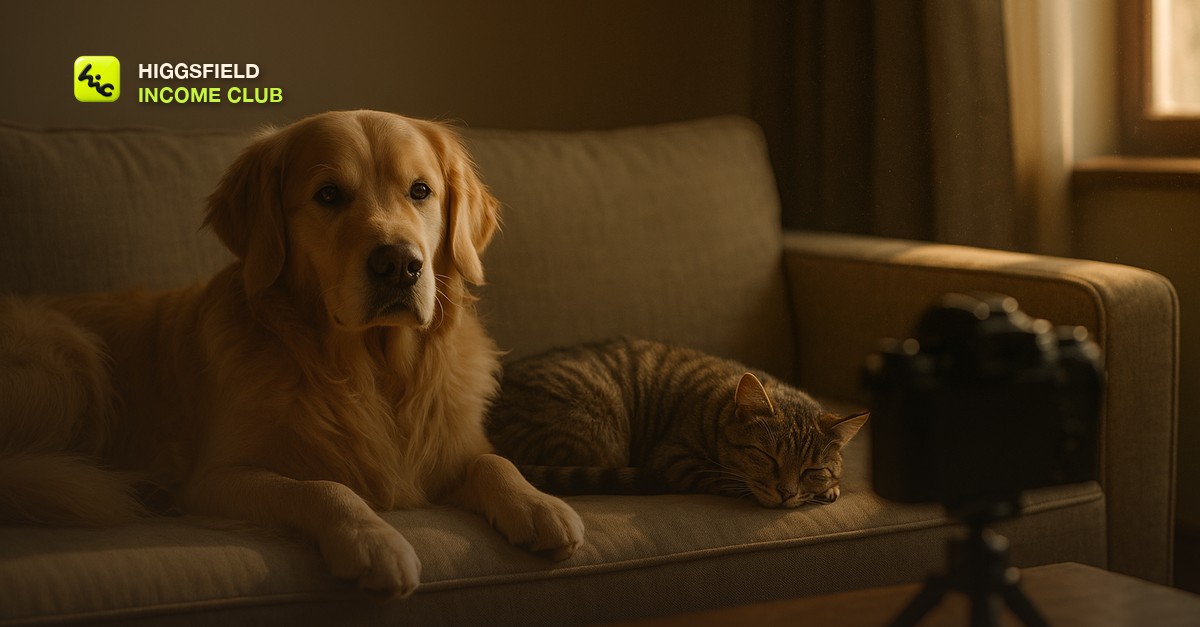
What makes an AI pet video look real
An AI pet video looks real when the animal stays the same animal from the first frame to the last. That sounds obvious, and it is the thing that goes wrong most. A spaniel's ear gets longer. A tabby's stripes rearrange. A white patch on a chest moves to a shoulder. People forgive a lot in AI video, but owners know their pet's face the way they know a family member's, and they spot a changed marking at once.
The second thing is weight. A real dog settles into a sofa. A real cat's breathing moves its whole side. When an AI animal floats a little above the surface or moves with no effort, it reads as a toy. Calm, grounded animals in soft light look real. Animals in fast action rarely do. So the club builds pet clips around stillness and lets the small movements do the work.
The Sit-Stay Rule: the club's framework for AI pet video
The Sit-Stay Rule is the framework club members use for every pet clip: the animal stays put, and only small things move. It has three parts. The pose is settled, the motion is small, and the camera does the travelling. A sequence can have several shots, but in each one the animal is sitting, lying, or standing still.
The Sit-Stay Rule
| Part | What to write in the prompt | What to leave out |
|---|---|---|
| Settled pose | The animal sitting, lying down, or standing still on a named surface, matching the reference photo | Walking, running, jumping, catching, climbing, anything where four legs have to stay in step |
| Small motion | Pick one or two: a slow blink, an ear twitch, a head tilt, gentle breathing, fur moving in a light breeze, a tail tip | Barking, eating, drinking, playing with a toy, interacting with a person or another animal |
| Camera travels | A slow push-in toward the face, a gentle arc, or a locked frame with shallow depth of field | Fast orbits, whip pans, and any move that shows the animal from an angle the photo does not |
The firsthand lesson behind the rule is that animal clips fail at the legs first and the face second. A dog lying on a rug with its ears moving will hold for a whole clip. The same dog trotting toward the camera will pick up a fifth leg or lose one in the crossover. So I stopped asking for the walk. The shots that owners and brands actually respond to are the close, quiet ones anyway: the look into the lens, the head tilt, the slow blink. The camera moves that stay stable are in [how to control camera motion in AI video](/blog/how-to-control-camera-motion-in-ai-video).
How to write the prompt for an AI pet video
A good pet prompt reads like a note from an animal photographer. It names the animal plainly, the pose, the surface, the light, and the one or two small things that move. It does not repeat the animal's markings in detail when you are working from a photo, because the photo already holds them and extra description invites the model to reinterpret them.
- Name the animal and the pose. A golden retriever lying on a linen sofa, head up, looking at the camera. Plain words work best.
- Name the surface and the setting. Animals look grounded when the prompt says what they are resting on.
- Name one light. Warm window light from the side, soft shadows. Side light shows fur texture. Flat front light makes a coat look painted.
- Give it small motion. Slow blink, slight ear movement, gentle breathing. Slow is the word that saves most pet clips.
- Set the camera. Slow push-in toward the face at eye level. Eye level with the animal feels intimate, and it hides the legs.
- Exclude what breaks. No walking, no people, no hands, no other animals, no text. Put the exclusions in plain words at the end.
Generate each shot a few times and keep the take where the face holds best. Then save the prompt. A groomer or a pet brand orders the same kind of shot again and again with a different animal in it, so a tested template with one slot for the pet is an asset. The system is in [how to build an AI video prompt library](/blog/build-an-ai-video-prompt-library), and the general structure is in [how to write Higgsfield video prompts that get results](/blog/how-to-write-higgsfield-video-prompts-that-get-results).
What AI still gets wrong with animals, and how to work around it
Some animal shots are still hard for every video model I have used. Knowing them before a client asks saves credits and saves an awkward conversation. These are the problem shots and what the club does instead.
Problem pet shots and the workaround
| Shot the client asks for | What usually goes wrong | What to do instead |
|---|---|---|
| Dog running toward the camera | Legs merge, multiply, or fall out of step | A settled pose with a slow push-in, or frame from the chest up so the legs are out of shot |
| Cat jumping onto a surface | The body stretches or changes shape in the air | Show the cat already on the surface, looking around |
| Pet playing with its owner | Hands and faces warp where they touch the animal | Keep people out of frame and let the animal carry the shot |
| Two pets together | Markings swap between the animals, or they blend at the edges | One animal moving per shot, the other asleep or out of frame |
| Long or curly coats | Fur shimmers or crawls between frames | Softer light, less camera movement, and a shorter clip |
| Name tags and packaging text | Letters misspell and shimmer | Add every word, name, and logo in the editor |
Fur shimmer is the quality problem that shows up most. The fixes are in [how to fix flickering in AI video](/blog/how-to-fix-flickering-in-ai-video). If the animal looks too smooth or too perfect, [why AI videos look fake](/blog/why-ai-videos-look-fake) covers how to bring the texture back. When the same pet has to appear across many clips, the approach is in [Higgsfield character consistency](/blog/higgsfield-character-consistency).
The Higgsfield workflow for a pet clip
The workflow is still first, motion second. You fix the photo as an image, get it approved, and only then spend video generations on it. Higgsfield's own homepage lists image models such as Nano Banana Pro alongside video models such as Seedance 2.5, and that pairing is the one this workflow needs: an image model to clean the still and a video model to move it.
- Get the right photo. Ask for a sharp, well-lit photo at the animal's eye level, with the whole face visible and the pet sitting or lying down.
- Fix the still. Clean the background and warm the light in an image model without changing the animal. Compare the markings against the original before you go on.
- Get a yes on the frame. The owner or the brand approves the still before any video generation. It is the cheapest place to catch a wrong marking.
- Animate with the Sit-Stay Rule. Small motion, slow camera, a few takes. The model choice is covered in [how to choose the right Higgsfield model for your shot](/blog/how-to-choose-the-right-higgsfield-model-for-your-shot).
- Cut for the placement. Vertical for Reels and TikTok, square for feeds. The formats are in [AI video aspect ratios explained](/blog/ai-video-aspect-ratios-explained).
- Finish in the editor. The pet's name, the offer, and quiet sound. The choices are in [sound design for AI-generated videos](/blog/sound-design-for-ai-generated-videos) and [how to add captions to AI-generated videos](/blog/how-to-add-captions-to-ai-generated-videos).
Who pays for AI pet videos
Pet video has two kinds of buyer: businesses that sell to pet owners, and owners themselves. The businesses are the better income, because their need repeats. A pet food brand launches a flavor, a groomer wants this week's before and after, a daycare wants something for the feed. Each of those is a new clip.
- Pet product brands: food, treats, beds, toys, collars. Product hero clips with a calm animal beside the product, for ads and store pages. See [AI video for Etsy and Shopify product listings](/blog/ai-video-for-etsy-and-shopify-product-listings) and [how to make UGC-style AI video ads](/blog/how-to-make-ugc-style-ai-video-ads).
- Local pet businesses: groomers, daycares, trainers, pet stores. A weekly clip for social from the photos they already take. The pitch is in [AI video for local businesses](/blog/ai-video-for-local-businesses).
- Owners: a keepsake clip made from a favorite photo. These are one-off jobs, and they need the most care, because the owner will check every marking.
- Your own faceless pet channel: cozy loops and calm animal moments, built with [how to start a faceless AI video channel](/blog/how-to-start-a-faceless-ai-video-channel) and [how to make AI video loops that hold attention](/blog/how-to-make-ai-video-loops-that-hold-attention).
The fastest way in is a spec clip. Take one good photo from a local groomer's own feed, make one Sit-Stay clip from it, and send it to them. The email for that is in [how to write a cold email for AI video clients](/blog/how-to-write-a-cold-email-for-ai-video-clients). Price the work with [how to price AI video services for clients](/blog/how-to-price-ai-video-services-for-clients), and if a realistic clip is going to run as an ad, read [do you have to disclose AI-generated video](/blog/do-you-have-to-disclose-ai-generated-video) first.
Inside the Higgsfield Income Club at higgsfieldincomeclub.com, $9/month, members share the pet prompts that are holding faces and markings right now, the problem shots they have found workarounds for, and the pitches that turned a groomer or a pet brand into a monthly client. If pets are the niche you keep coming back to, start with one sharp photo and one Sit-Stay clip this week.
Short, practical drops on income paths, prompts that work, packaging for views, and getting paid. No spam, unsubscribe anytime.
Frequently asked questions
How do you make AI pet videos look real?
Start from a sharp photo of the actual animal rather than a text description, keep the pet sitting or lying down, and let only small things move, such as a blink, an ear, or breathing. Use soft side light and a slow camera push. The reference photo is what keeps the markings and the face correct.
Why do AI animals get extra legs?
Walking and running need four legs to stay in step across every frame, and video models still lose track of them where the legs cross. The club's workaround is to avoid the walk entirely: use a settled pose, or frame the animal from the chest up so the legs are out of shot.
What is the Sit-Stay Rule?
It is the club's framework for AI pet video: the animal holds a settled pose, only one or two small things move, and the camera does the travelling. A sequence can have several shots, but in each one the animal is sitting, lying, or standing still.
Can I make an AI video of my own pet from a photo?
Yes. Use a sharp, well-lit photo taken at the animal's eye level with the whole face visible. Clean up the still first if it needs it, check the markings against the original, and then animate it with small, slow motion.
Which Higgsfield tools work for pet video?
Higgsfield's homepage lists image models such as Nano Banana Pro and video models such as Seedance 2.5. The club's workflow is to clean the still in an image model, get it approved, and then animate it with a video model using the Sit-Stay Rule.
Who buys AI pet videos?
Pet product brands, groomers, daycares, trainers, and pet stores buy clips for ads and social posts, and owners buy keepsake clips of their own animals. Businesses are the steadier income because their need for new clips repeats.
Last reviewed by David on September 30, 2026
